
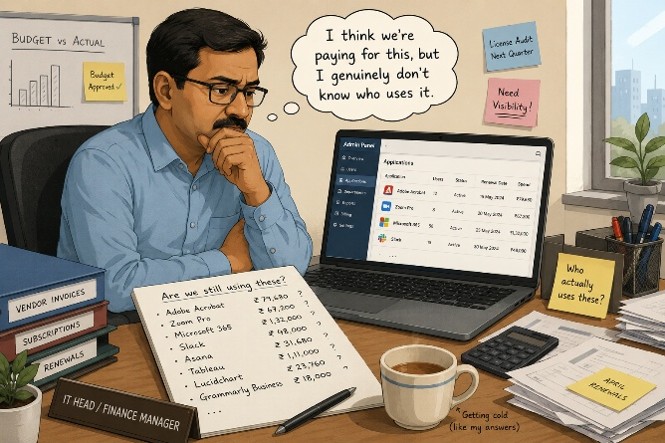
Your software bill is not just a bill. It is a fossil record. It preserves every rushed hire, forgotten exit, and vendor shortcut your company ever made, then renews every year before anyone looks too closely.
Somewhere in your company, there may be a Microsoft 365 license assigned to a person who left eight months ago. There may be a Salesforce seat for someone who moved to a client-side role and never got deactivated. There may be a design tool your marketing team used for one campaign that still charges your card every month because cancelling it kept getting pushed.
None of this is usually one person's fault. It is how software billing works. It does not wait for your HR process. It does not ask whether the person still shows up. It just renews.
“Software waste does not announce itself. It just renews.”
1E found that companies generate an estimated $34 billion in yearly licensing waste worldwide. Around 30% of licensed applications sit completely unused, and another 8% are opened less than once a month. Nearly four in ten licenses can quietly keep billing, accumulated over years of hiring, attrition, and missed cleanup.
Why Software Waste Keeps Happening
Imagine a business with 50 people. It buys 55 Microsoft 365 licenses to allow for expected hires. Three people join and get licenses. Two people leave, but deactivation gets added to someone's to-do list and quietly stays there. One person changes roles but keeps the higher-tier plan they no longer need. A department head puts a design tool on the company card for a one-week project. The subscription never gets cancelled.
Nothing looks wrong in month one. Finance confirms. IT says it looks fine. Someone approves it. By year three, the software stack reflects the company you used to be, not the one you are.
46% of software licenses go unused in any 30-day period
Zylo's SaaS Management Index reported that nearly half of software licenses go unused in any 30-day period across organizations globally. The problem is not always carelessness. It is that software billing does not wait for HR hygiene.
Only 5.5% of IT leaders globally say they have complete visibility into how many employees actively use their licensed software. Everyone else is making educated guesses and renewing based on them.
A Four-Minute License Check
Before you look at a renewal, check the specific gap between what you have licensed and what your team actually opens. The invoice total is not enough.
- Microsoft 365 unused seats: go to admin.microsoft.com -> Billing -> Licenses. The Available number next to each product is paid capacity assigned to nobody.
- Microsoft 365 inactive users: go to Reports -> Usage -> Microsoft 365 Apps Usage and filter by 90 days. Users with licenses but no activity in three months are still billing.
- Plan mismatch: check how many Business Premium users only open email, Teams, and Word. They may be on a plan built for security-sensitive power users, not standard employees.
- Google Workspace: check Admin Console -> Billing -> Subscriptions, then Reports -> Users -> Last Login for inactive accounts still drawing fees.
- Zoho One: check Admin Panel -> Subscription -> Manage Users. Anyone not logged in for 60 or more days is worth reviewing.
The Four Leaks Draining Your IT Budget
Leak 1: unused seats
People join and receive licenses. People leave and the licenses stay. Offboarding is often manual, rushed, and split between HR, IT, and Finance. That means three teams, three lists, and plenty of room for missed cleanup.
One company recovered Rs. 72 lakh annually after a license cleanup, equal to 29% of its Microsoft 365 bill, without changing a single workflow. The savings appeared because someone finally looked.
Leak 2: the wrong plan for the wrong person
Not every employee needs the same Microsoft 365 plan. IT admins, finance heads, and HR managers may genuinely need Business Premium for advanced security, device management, and compliance controls. Field teams, sales executives, support staff, and junior operations teams may only need email, Teams, and shared documents.
The gap between Basic and Premium can be Rs. 1,700 to Rs. 2,000 per user per month. For 60 employees who only need basic collaboration, that can become Rs. 12 to Rs. 14 lakh per year, or Rs. 37 to Rs. 43 lakh over three years.
Leak 3: premium features nobody turned on
A company upgrades to Business Premium. The vendor configures email and Teams and signs off the project. Nobody turns on endpoint policies. Intune stays at default. Microsoft Defender for Business sits unconfigured, watching nothing and alerting nobody.
The company is paying Premium pricing while operating like it is on Basic. The feature difference that justified the upgrade contributes zero actual security.
Leak 4: renewals nobody challenges
The vendor sends a renewal notice 30 days out. Finance forwards it to IT. IT confirms the product is still in use. Finance approves. Another year locks in.
That is not a review. It is a payment confirmation. A real renewal review starts 90 days before the contract date, when you still have leverage to audit usage, remove unused seats, downgrade mismatched users, benchmark pricing, and negotiate from data instead of deadline pressure.
Same Logo, Different Bill
Several Indian companies can buy the same Microsoft 365 Business Premium plan for the same 100 users and still receive different bills. One buys direct on a monthly commitment. One buys through a CSP partner on an annual plan. One negotiated during Microsoft's fiscal quarter. One has auto-renewed three times without a pricing conversation.
“The question is not how much the license costs. It is whether what you are currently paying is the best available answer to that question.”
What Good License Hygiene Looks Like
- Every month, inactive users are flagged and reviewed.
- Every quarter, seat count is compared against current headcount and actual usage data.
- 90 days before every major renewal, usage, pricing, plan fit, and negotiation options are reviewed.
- Every new tool purchase is checked against what is already included in existing subscriptions.
The gap between has a license, uses the license, and needs this specific license is where the money goes.
How Skysecure Marketplace Helps
Skysecure Marketplace was built for this problem. Businesses can connect a Microsoft tenant in read-only mode, without changing the environment, and map every license held, how many are assigned, and how many are idle. Built-in AI analyzes the stack against current plan options and flags what to buy, what to drop, and which tier matches usage patterns.
The License Fit tool takes this further. Enter your current license count, cost per user, plan type, and active versus inactive users, and it returns a report showing exact waste, what a rightsized stack costs, and the payback period on making the switch.
Every product is available for comparison in one place: plans, pricing, features, and community reviews from people who have deployed the software. No vendor back-and-forth, no six-tab research, and no quote that expires before you can act on it.
Frequently Asked Questions
How do I check unused Microsoft 365 licenses right now?
Go to admin.microsoft.com -> Billing -> Licenses. The Available count next to each product shows licenses paid for with no user assigned. Then check Reports -> Usage -> Microsoft 365 Apps Usage and filter by 90 days. The gap between assigned and actively used is your real waste number, and it is often larger than the unassigned count alone.
What is license fit?
Seat auditing tells you who is not using a license. License Fit evaluates whether the plan itself is right for each user type, calculates savings from matching plan to actual usage, and compares your per-user cost against current market benchmarks.
Should we always choose the cheapest plan?
No. The cheapest plan is wrong when users genuinely need advanced security, device management, or compliance controls. The mistake is not buying premium licenses. The mistake is buying them for everyone, including people who only need email and shared documents.
Is this only a Microsoft 365 problem?
No. The same pattern applies to Google Workspace, Zoho, Adobe, CRM tools, HRMS platforms, endpoint security, backup tools, and AI subscriptions. Microsoft 365 is often the easiest starting point because the admin center gives accessible usage data.